> ## Documentation Index
> Fetch the complete documentation index at: https://cloud-docs.orbi.build/llms.txt
> Use this file to discover all available pages before exploring further.
# File your first Issue
> How do I dispatch work to Orbi and how should I write the Issue?
You dispatch work by creating a normal GitHub Issue in your connected repository and adding the `ai-ready` label.
That label is the execution switch. Nothing else is required — no command, no form, no separate queue. Orbi checks for newly labelled Issues on a timer, so pickup takes **up to five minutes**.
## Dispatch an Issue
1. In your connected repository on GitHub, create an Issue describing one change.
2. Add the **`ai-ready`** label.
The label already exists — [provisioning](/provisioning) created it along with the rest of the `ai-*` set.
Within about five minutes, `ai-in-progress` appears on the Issue and it shows up under **Doing** on the status page.
Orbi only works on Issues in the repository you connected. An Issue in any other repository is ignored, even if the App is installed there.
### Dispatching from the status page
You do not have to label by hand. When you have open Issues that Orbi has not been given yet, the status page lists them under **Pick one for Orbi to try**, each with a **Let Orbi try this one** button that applies the `ai-ready` label for you.
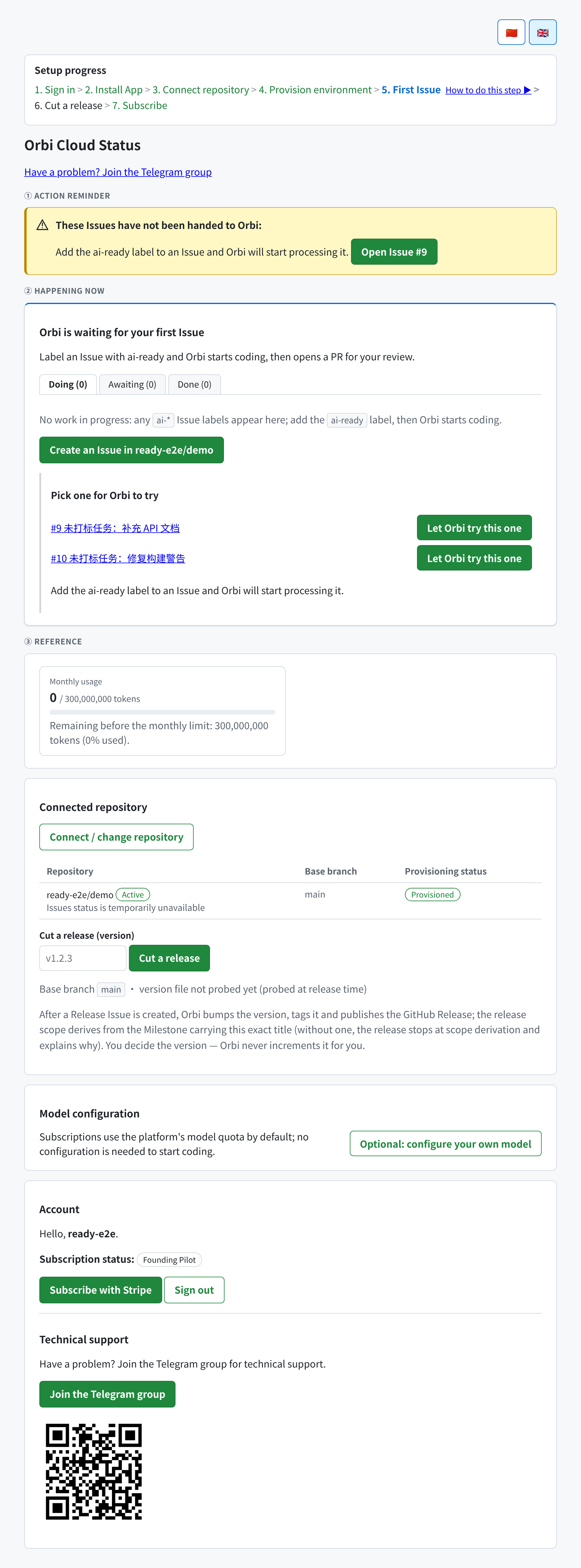 There is also a **Create an Issue in `owner/repo`** button that opens GitHub's new-Issue form for your connected repository with the label preselected.
An Issue that already carries any `ai-*` label is not offered here — Orbi is already handling it, or has finished with it.
## How to write the Issue
Write it the way you would for a capable colleague who has not seen your codebase before. Orbi reads the Issue body and comments as its instructions, so what you put there is the specification.
The things that consistently matter:
**Say what should change, and where it is if you know.** "The export button on the reports page produces a CSV with no header row; it should include one" gives more to work with than "fix export".
**Say how you will know it worked.** An acceptance criterion is what the independent review checks against. "A downloaded CSV starts with a header row matching the column titles" is checkable; "export works properly" is not.
**Keep one Issue to one change.** A bundled Issue produces a bundled pull request that is harder to review and more likely to need repair rounds.
**Name constraints explicitly.** If a public API must not change, if a file is off limits, or if a specific approach is required, say so in the Issue. Orbi will not infer prohibitions.
**Do not ask for things the environment cannot do.** A delivery runs in an isolated environment with your repository, not against your production systems. Acceptance criteria that require production credentials, real third-party accounts, or a live deployment cannot be satisfied there — and an Issue that demands them will spin until it reaches `ai-blocked`. If you need that kind of evidence, gather it yourself and state in the Issue that it is out of scope for the delivery.
## Choosing what to start with
Your first Issue is worth choosing deliberately. A well-scoped small change — a bug with a clear reproduction, a missing test, a contained refactor — finishes fast and shows you the whole loop. Save the ambiguous architectural work until you have seen how Orbi handles your codebase.
Note that **your CI defines what is guaranteed.** The review runs your repository's test suite; the release gate reads your repository's check runs. If your repository has strong tests, Orbi's guarantees are strong. If it has none, both gates pass vacuously and the delivery ships on the review's judgement alone.
## Steering a delivery in flight
You do not have to wait for the result to correct course. While an Issue is `ai-in-progress`, add a comment with the new decision or edit the Issue body — the running session picks the correction up and restarts with it, usually within a minute.
A delivery accepts 3 such restarts, and only comments from the repository's owner, maintainers, members or collaborators can steer it. See [steering a delivery](/delivery-lifecycle#steering-a-delivery-that-is-already-running).
## Priority
Add the **`p0`** label to have an Issue picked up ahead of others. The pickup order is `p0` first, then Issues labelled `bug`, then everything else.
## Other kinds of work
`ai-ready` dispatches development work by default. Pair it with a second label for other task types — ops and research (`ai-ops-only`), content (`ai-content-only`), or a release (`ai-release`). See [the delivery lifecycle](/delivery-lifecycle#task-types).
## What happens next
Follow it on the Issue's labels or on [the status page](/status-page). The sequence you are looking for is `ai-in-progress` → `ai-pr-opened` → `ai-merged`; a repair round shows up as `ai-fix-needed` in between, which is normal.
When a pull request is open and waiting for you, the status page says so under **Awaiting**.
There is also a **Create an Issue in `owner/repo`** button that opens GitHub's new-Issue form for your connected repository with the label preselected.
An Issue that already carries any `ai-*` label is not offered here — Orbi is already handling it, or has finished with it.
## How to write the Issue
Write it the way you would for a capable colleague who has not seen your codebase before. Orbi reads the Issue body and comments as its instructions, so what you put there is the specification.
The things that consistently matter:
**Say what should change, and where it is if you know.** "The export button on the reports page produces a CSV with no header row; it should include one" gives more to work with than "fix export".
**Say how you will know it worked.** An acceptance criterion is what the independent review checks against. "A downloaded CSV starts with a header row matching the column titles" is checkable; "export works properly" is not.
**Keep one Issue to one change.** A bundled Issue produces a bundled pull request that is harder to review and more likely to need repair rounds.
**Name constraints explicitly.** If a public API must not change, if a file is off limits, or if a specific approach is required, say so in the Issue. Orbi will not infer prohibitions.
**Do not ask for things the environment cannot do.** A delivery runs in an isolated environment with your repository, not against your production systems. Acceptance criteria that require production credentials, real third-party accounts, or a live deployment cannot be satisfied there — and an Issue that demands them will spin until it reaches `ai-blocked`. If you need that kind of evidence, gather it yourself and state in the Issue that it is out of scope for the delivery.
## Choosing what to start with
Your first Issue is worth choosing deliberately. A well-scoped small change — a bug with a clear reproduction, a missing test, a contained refactor — finishes fast and shows you the whole loop. Save the ambiguous architectural work until you have seen how Orbi handles your codebase.
Note that **your CI defines what is guaranteed.** The review runs your repository's test suite; the release gate reads your repository's check runs. If your repository has strong tests, Orbi's guarantees are strong. If it has none, both gates pass vacuously and the delivery ships on the review's judgement alone.
## Steering a delivery in flight
You do not have to wait for the result to correct course. While an Issue is `ai-in-progress`, add a comment with the new decision or edit the Issue body — the running session picks the correction up and restarts with it, usually within a minute.
A delivery accepts 3 such restarts, and only comments from the repository's owner, maintainers, members or collaborators can steer it. See [steering a delivery](/delivery-lifecycle#steering-a-delivery-that-is-already-running).
## Priority
Add the **`p0`** label to have an Issue picked up ahead of others. The pickup order is `p0` first, then Issues labelled `bug`, then everything else.
## Other kinds of work
`ai-ready` dispatches development work by default. Pair it with a second label for other task types — ops and research (`ai-ops-only`), content (`ai-content-only`), or a release (`ai-release`). See [the delivery lifecycle](/delivery-lifecycle#task-types).
## What happens next
Follow it on the Issue's labels or on [the status page](/status-page). The sequence you are looking for is `ai-in-progress` → `ai-pr-opened` → `ai-merged`; a repair round shows up as `ai-fix-needed` in between, which is normal.
When a pull request is open and waiting for you, the status page says so under **Awaiting**.