> ## Documentation Index
> Fetch the complete documentation index at: https://cloud-docs.orbi.build/llms.txt
> Use this file to discover all available pages before exploring further.
# Model configuration
> Do I need to configure a model, and how do I use my own API key instead?
You do not need to configure a model — a subscription includes model usage — but you can bring your own key if you would rather pay your provider directly.
By default, deliveries run on Orbi's platform model channel using the tokens included in your plan. That is why you can install, connect and complete a delivery without entering any key at all.
Configuring your own key — **BYOK**, bring your own key — replaces that channel for your tenant. Use it when you want a specific model, when your organization requires the traffic to go through your own provider account, or when you would rather not be limited by the included monthly quota.
## When you should configure a key
| Situation | What to do |
| ------------------------------------------------------- | ------------------------------------------------------------------ |
| You just want it to work | Nothing. The included quota is used automatically |
| You want a specific model | Configure BYOK with that provider and model |
| Your compliance rules require your own provider account | Configure BYOK |
| You have hit the monthly token quota | Configure BYOK — BYOK tenants are not subject to the quota's pause |
## Configure it
From the status page, in the **Model configuration** card, click **Optional: configure your own model**.
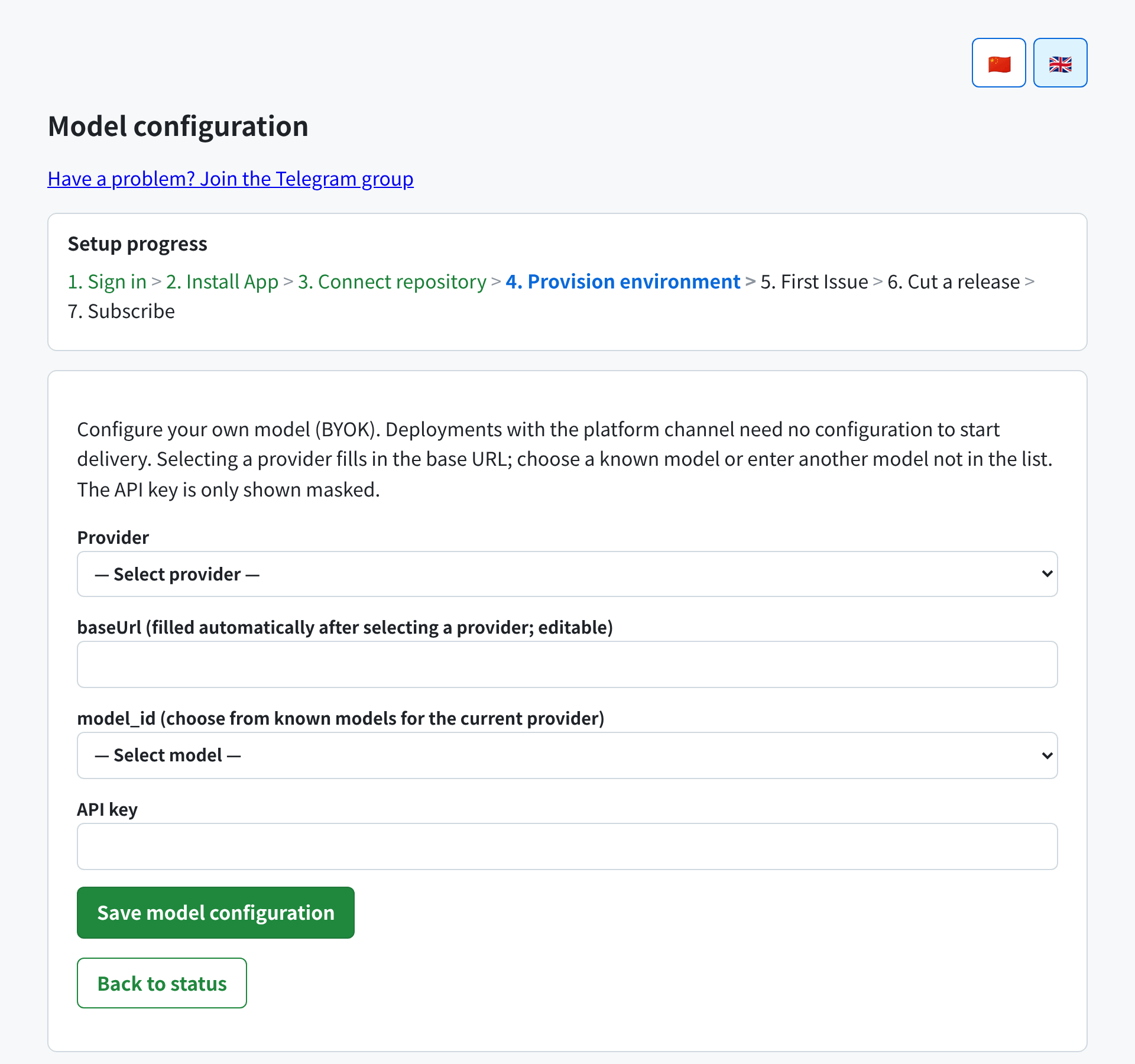 1. **Provider** — pick from the list. Selecting one fills in the base URL for you.
2. **baseUrl** — filled automatically, and editable. Change it only if you use a proxy or a private gateway.
3. **model\_id** — choose from that provider's known models, or use **Enter another model** to type a model ID that is not in the list.
4. **API key** — your key from that provider.
Click **Save model configuration**.
Saving takes effect for deliveries that start afterwards. If provisioning had failed because of a bad credential, saving a corrected configuration retries it automatically.
## How your key is stored
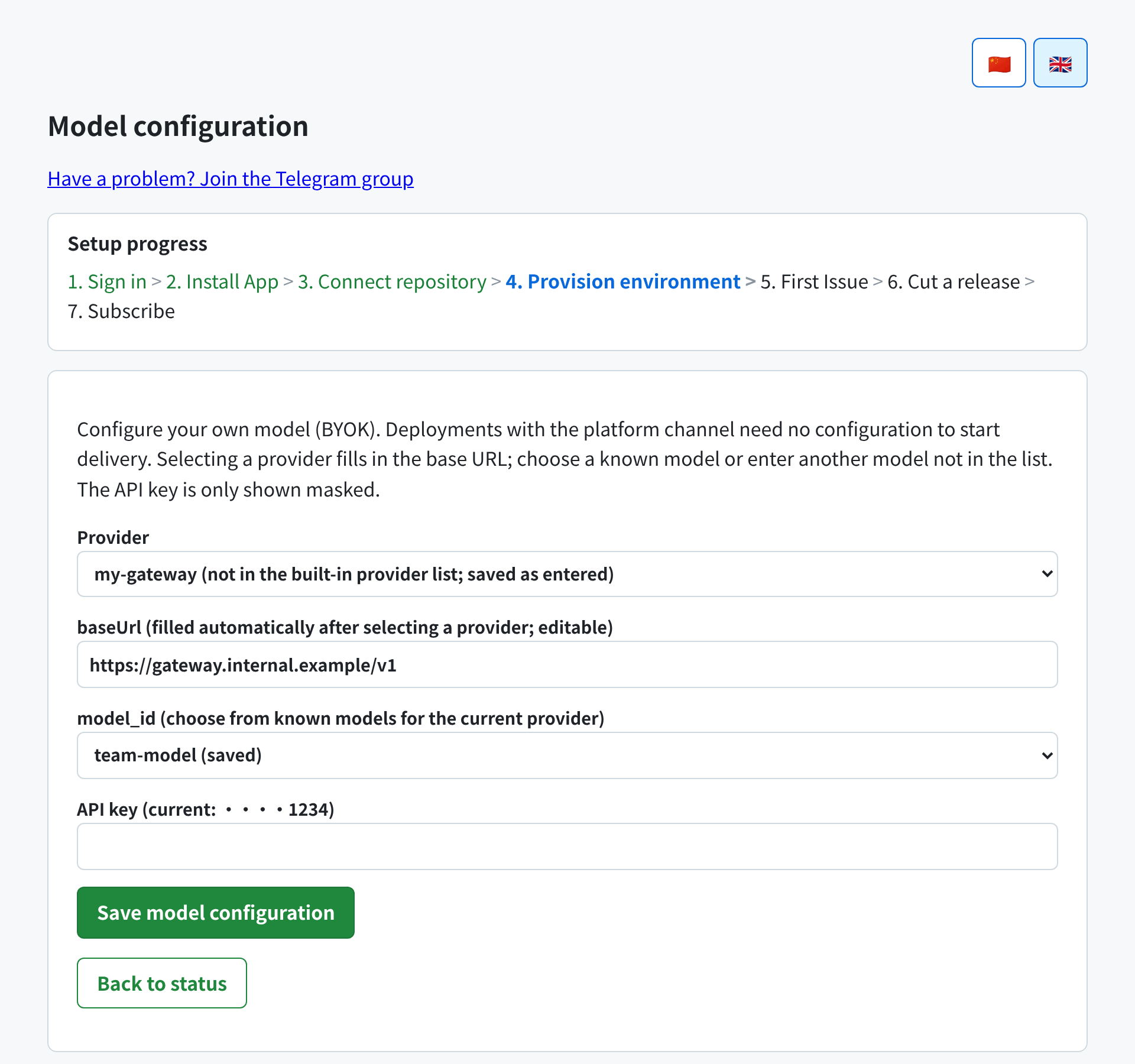
Your API key is **encrypted at rest** and is only ever displayed back to you masked — the page shows something like `••••1234`, never the key itself. It is never written to logs, never included in support evidence bundles, and never shown in any interface that could be shared.
1. **Provider** — pick from the list. Selecting one fills in the base URL for you.
2. **baseUrl** — filled automatically, and editable. Change it only if you use a proxy or a private gateway.
3. **model\_id** — choose from that provider's known models, or use **Enter another model** to type a model ID that is not in the list.
4. **API key** — your key from that provider.
Click **Save model configuration**.
Saving takes effect for deliveries that start afterwards. If provisioning had failed because of a bad credential, saving a corrected configuration retries it automatically.
## How your key is stored
Your API key is **encrypted at rest** and is only ever displayed back to you masked — the page shows something like `••••1234`, never the key itself. It is never written to logs, never included in support evidence bundles, and never shown in any interface that could be shared.
 Do not send your key over email or paste it into a GitHub Issue, pull request or comment. Enter it on this page — that is the only channel you need.
## Supported providers
Selecting one of these fills in its base URL automatically. Their names appear in the dropdown as shown in the **In the dropdown** column.
| Provider | In the dropdown | Base URL |
| ----------------------------------- | ------------------- | --------------------------------------------------------- |
| OpenAI | OpenAI | `https://api.openai.com/v1` |
| DeepSeek | DeepSeek | `https://api.deepseek.com/v1` |
| Z.ai (GLM) | 智谱 z.ai | `https://api.z.ai/api/paas/v4` |
| Z.ai Coding Plan | 智谱 z.ai Coding Plan | `https://api.z.ai/api/coding/paas/v4` |
| Zhipu BigModel | 智谱 bigmodel | `https://open.bigmodel.cn/api/paas/v4` |
| Moonshot Kimi (China) | Kimi 国内 | `https://api.moonshot.cn/v1` |
| Moonshot Kimi (International) | Kimi 国际 | `https://api.moonshot.ai/v1` |
| OpenRouter | OpenRouter | `https://openrouter.ai/api/v1` |
| Groq | Groq | `https://api.groq.com/openai/v1` |
| Alibaba DashScope (Qwen) | 通义千问(DashScope) | `https://dashscope.aliyuncs.com/compatible-mode/v1` |
| xAI | xAI | `https://api.x.ai/v1` |
| Mistral | Mistral | `https://api.mistral.ai/v1` |
| MiniMax (China) | MiniMax 国内 | `https://api.minimax.chat/v1` |
| MiniMax (International) | MiniMax 国际 | `https://api.minimaxi.com/v1` |
| SiliconFlow | 硅基流动 | `https://api.siliconflow.cn/v1` |
| Together | Together | `https://api.together.xyz/v1` |
| Cerebras | Cerebras | `https://api.cerebras.ai/v1` |
| Volcengine Ark | 火山方舟 | `https://ark.cn-beijing.volces.com/api/v3` |
| Anthropic (compatibility layer) | Anthropic(兼容层) | `https://api.anthropic.com/v1` |
| Google Gemini (compatibility layer) | Google Gemini(兼容层) | `https://generativelanguage.googleapis.com/v1beta/openai` |
Each provider offers a list of known model IDs in the **model\_id** dropdown. That list is a convenience, not a limit — **Enter another model** accepts any model ID the provider serves.
A provider being listed is not a promise that your account has quota, access or rate limit for a given model on it. If a model is not available to your key, the delivery fails with the provider's own error.
## Using a provider that is not listed
Choose any provider as a starting point, then edit **baseUrl** to your gateway's URL and type the model ID with **Enter another model**. Any OpenAI-compatible endpoint works. Your configuration is stored as you entered it and shown back to you unchanged.
## Removing your key
Clearing your configuration returns your tenant to the platform channel and the included quota.
## What changes when you use BYOK
| | Platform channel (default) | Your own key |
| ------------------------------ | -------------------------------------------------- | ----------------------------------------------------- |
| Who pays for tokens | Included in your plan | You pay your provider |
| Monthly token quota | 300,000,000 per month; deliveries pause at the cap | Not applied — your usage is measured but never paused |
| Model choice | Operated by Orbi | Yours |
| Usage shown on the status page | Yes | Yes |
See [limits and quotas](/limits-and-quotas) for how the quota is counted.
Do not send your key over email or paste it into a GitHub Issue, pull request or comment. Enter it on this page — that is the only channel you need.
## Supported providers
Selecting one of these fills in its base URL automatically. Their names appear in the dropdown as shown in the **In the dropdown** column.
| Provider | In the dropdown | Base URL |
| ----------------------------------- | ------------------- | --------------------------------------------------------- |
| OpenAI | OpenAI | `https://api.openai.com/v1` |
| DeepSeek | DeepSeek | `https://api.deepseek.com/v1` |
| Z.ai (GLM) | 智谱 z.ai | `https://api.z.ai/api/paas/v4` |
| Z.ai Coding Plan | 智谱 z.ai Coding Plan | `https://api.z.ai/api/coding/paas/v4` |
| Zhipu BigModel | 智谱 bigmodel | `https://open.bigmodel.cn/api/paas/v4` |
| Moonshot Kimi (China) | Kimi 国内 | `https://api.moonshot.cn/v1` |
| Moonshot Kimi (International) | Kimi 国际 | `https://api.moonshot.ai/v1` |
| OpenRouter | OpenRouter | `https://openrouter.ai/api/v1` |
| Groq | Groq | `https://api.groq.com/openai/v1` |
| Alibaba DashScope (Qwen) | 通义千问(DashScope) | `https://dashscope.aliyuncs.com/compatible-mode/v1` |
| xAI | xAI | `https://api.x.ai/v1` |
| Mistral | Mistral | `https://api.mistral.ai/v1` |
| MiniMax (China) | MiniMax 国内 | `https://api.minimax.chat/v1` |
| MiniMax (International) | MiniMax 国际 | `https://api.minimaxi.com/v1` |
| SiliconFlow | 硅基流动 | `https://api.siliconflow.cn/v1` |
| Together | Together | `https://api.together.xyz/v1` |
| Cerebras | Cerebras | `https://api.cerebras.ai/v1` |
| Volcengine Ark | 火山方舟 | `https://ark.cn-beijing.volces.com/api/v3` |
| Anthropic (compatibility layer) | Anthropic(兼容层) | `https://api.anthropic.com/v1` |
| Google Gemini (compatibility layer) | Google Gemini(兼容层) | `https://generativelanguage.googleapis.com/v1beta/openai` |
Each provider offers a list of known model IDs in the **model\_id** dropdown. That list is a convenience, not a limit — **Enter another model** accepts any model ID the provider serves.
A provider being listed is not a promise that your account has quota, access or rate limit for a given model on it. If a model is not available to your key, the delivery fails with the provider's own error.
## Using a provider that is not listed
Choose any provider as a starting point, then edit **baseUrl** to your gateway's URL and type the model ID with **Enter another model**. Any OpenAI-compatible endpoint works. Your configuration is stored as you entered it and shown back to you unchanged.
## Removing your key
Clearing your configuration returns your tenant to the platform channel and the included quota.
## What changes when you use BYOK
| | Platform channel (default) | Your own key |
| ------------------------------ | -------------------------------------------------- | ----------------------------------------------------- |
| Who pays for tokens | Included in your plan | You pay your provider |
| Monthly token quota | 300,000,000 per month; deliveries pause at the cap | Not applied — your usage is measured but never paused |
| Model choice | Operated by Orbi | Yours |
| Usage shown on the status page | Yes | Yes |
See [limits and quotas](/limits-and-quotas) for how the quota is counted.