> ## Documentation Index
> Fetch the complete documentation index at: https://cloud-docs.orbi.build/llms.txt
> Use this file to discover all available pages before exploring further.
# Provisioning
> What is provisioning, how long does it take, and what do I do if it fails?
Provisioning builds the isolated environment your deliveries run in, and it starts automatically the moment you connect a repository.
You do not trigger it and you cannot speed it up. It normally takes **one to two minutes**, and the status page updates itself while it runs.
## What happens during provisioning
Orbi creates an environment dedicated to your repository, clones the repository into it, installs the delivery engine, and runs the engine's setup step against your repository. That setup is what creates the `ai-*` labels — `ai-ready`, `ai-in-progress`, `ai-pr-opened`, `ai-fix-needed`, `ai-merged`, `ai-blocked` and the rest — in your repository's label list.
Setup is declarative: a missing label is created, a drifted one is corrected, and nothing is ever deleted. Your own labels (`bug`, `enhancement`, whatever you use) are never touched.
Each environment belongs to exactly one tenant and one repository. Environments are isolated from one another at the operating-system level.
## Watching it
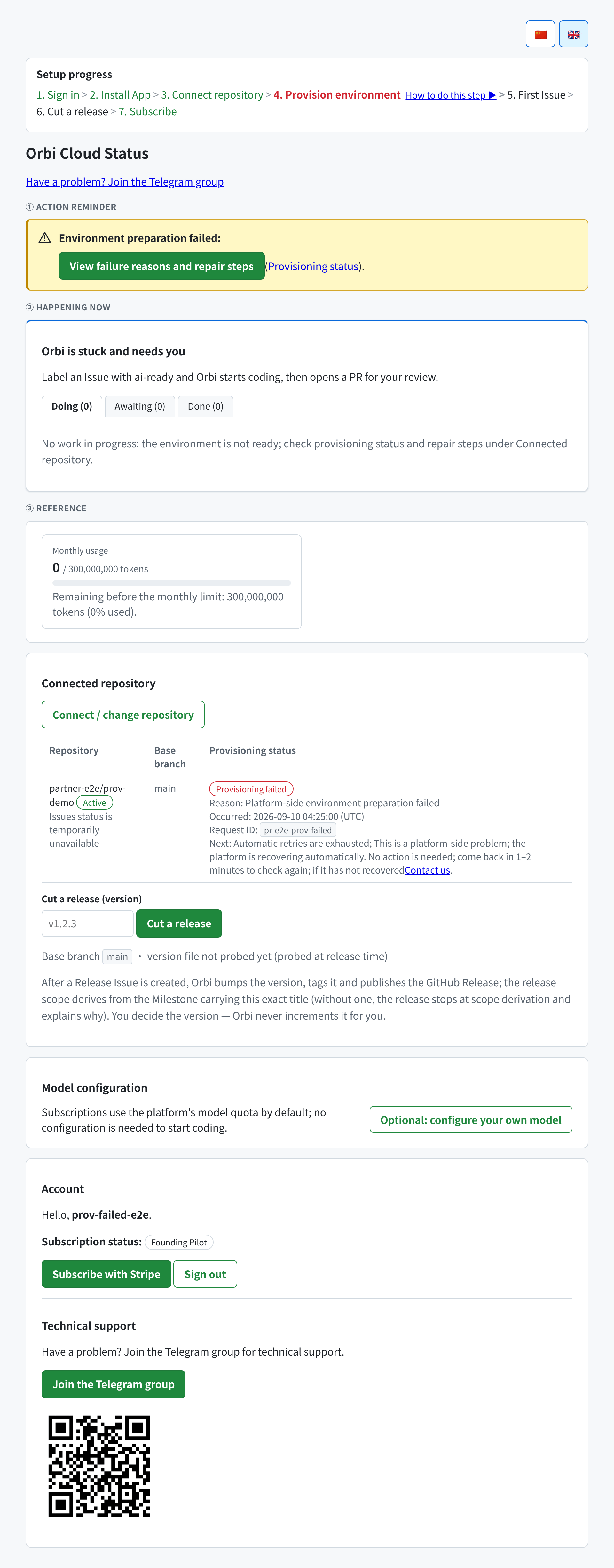
The **Provisioning status** column in the **Connected repository** card shows where it is:
| What you see | What it means |
| ----------------------- | ---------------------------------------------------------------------------------- |
| **Provisioning** | Running. Usually one to two minutes; the page refreshes itself |
| **Provisioned** | Done. You can [file your first Issue](/first-issue) |
| **Provisioning failed** | Stopped. The card states the reason and the next step |
| **—** | Provisioning was never triggered — normally because no repository is connected yet |
## When provisioning fails
A failure is never a dead end, and the card always names both a reason and a next step. There are four classes:
 ### The GitHub App installation or authorization is no longer valid
Orbi can no longer mint a token for your installation — usually because the App was uninstalled, or its access to the repository was removed.
**What to do:** reinstall or re-authorize the GitHub App, then retry. The card links to the connect page for this.
### The model credential was not accepted
Your own model key was rejected by the provider.
**What to do:** open [model configuration](/model-configuration) and correct the key. Saving a new configuration automatically retries provisioning — you do not need to reconnect the repository.
### The model service could not be reached
The key or the base URL appears to be wrong, or the provider is unreachable.
**What to do:** check the base URL and key on the [model configuration](/model-configuration) page. As above, saving retries provisioning automatically.
### A platform-side failure
Anything not attributable to your installation or your model configuration is ours.
**What to do:** nothing. The platform recovers automatically. The card says so explicitly, and asks you to check back in a minute or two. If it has not recovered after that, contact support — the card includes a **request ID** that identifies your exact provisioning attempt, so quote it.
## Retries
Provisioning retries automatically a limited number of times. The card tells you which situation you are in: either **provisioning will retry automatically**, or **automatic retries are exhausted**.
When retries are exhausted for a tenant-side cause, fixing the cause rearms it — saving a corrected model configuration retries even an exhausted request. When they are exhausted for a platform-side cause, platform recovery takes over without any action from you.
## After provisioning succeeds
Nothing else is required. The environment stays provisioned; you do not reprovision between deliveries. [File an Issue and label it `ai-ready`](/first-issue).
Connecting a **different** repository provisions a fresh environment for it.
### The GitHub App installation or authorization is no longer valid
Orbi can no longer mint a token for your installation — usually because the App was uninstalled, or its access to the repository was removed.
**What to do:** reinstall or re-authorize the GitHub App, then retry. The card links to the connect page for this.
### The model credential was not accepted
Your own model key was rejected by the provider.
**What to do:** open [model configuration](/model-configuration) and correct the key. Saving a new configuration automatically retries provisioning — you do not need to reconnect the repository.
### The model service could not be reached
The key or the base URL appears to be wrong, or the provider is unreachable.
**What to do:** check the base URL and key on the [model configuration](/model-configuration) page. As above, saving retries provisioning automatically.
### A platform-side failure
Anything not attributable to your installation or your model configuration is ours.
**What to do:** nothing. The platform recovers automatically. The card says so explicitly, and asks you to check back in a minute or two. If it has not recovered after that, contact support — the card includes a **request ID** that identifies your exact provisioning attempt, so quote it.
## Retries
Provisioning retries automatically a limited number of times. The card tells you which situation you are in: either **provisioning will retry automatically**, or **automatic retries are exhausted**.
When retries are exhausted for a tenant-side cause, fixing the cause rearms it — saving a corrected model configuration retries even an exhausted request. When they are exhausted for a platform-side cause, platform recovery takes over without any action from you.
## After provisioning succeeds
Nothing else is required. The environment stays provisioned; you do not reprovision between deliveries. [File an Issue and label it `ai-ready`](/first-issue).
Connecting a **different** repository provisions a fresh environment for it.